


Facebook to Delete Additional Profiles After December 14: What Users Need to Know

Meta is discontinuing Facebook's Additional Personal Profiles feature, with existing secondary profiles scheduled for permanent deletion after December 14, 2026.
The change affects users who created additional profiles under their primary Facebook account to maintain separate spaces for different interests, communities, and social circles. Meta announced the decision on November 12, saying the feature had added complexity to the platform and made it harder to deliver a consistent experience.
Users who rely on these profiles have a limited window to download their information, review their connections, and make arrangements for any Facebook Groups or other activities they manage through them.
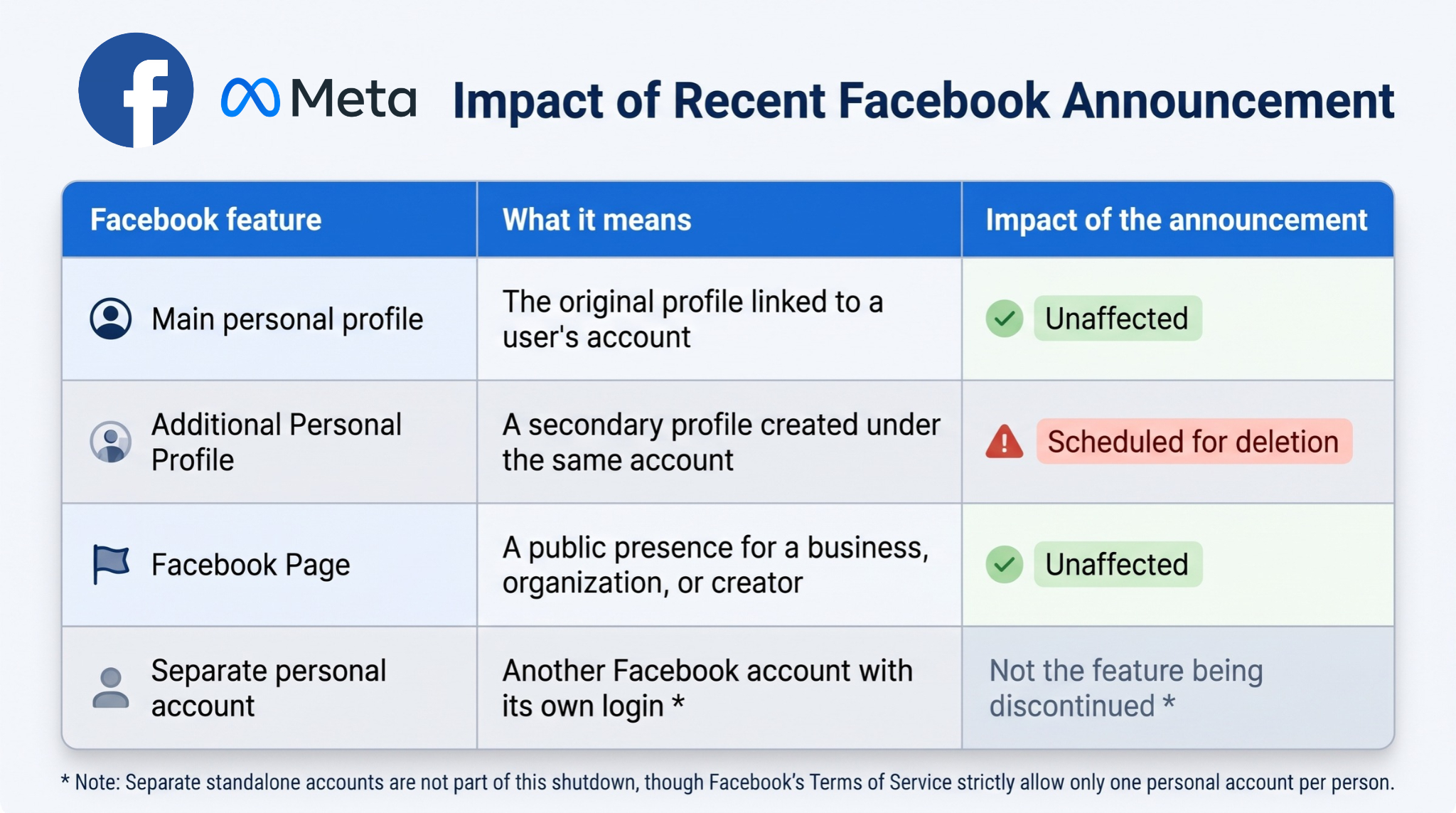
However, the change does not mean that Facebook is deleting users' original accounts or business Pages. Meta has confirmed that primary personal profiles and Facebook Pages will remain unaffected.
What are Facebook's Additional Personal Profiles?
Meta introduced Additional Personal Profiles in September 2023, allowing eligible adult users to create up to four additional profiles under a single Facebook account.
The feature was designed to let users maintain different identities and social circles without having to create separate accounts or repeatedly sign in and out.
For example, someone could use their main profile to connect with family and colleagues, while maintaining another profile for gaming communities, hobbies, marketplace activities, or other interests.
Each additional profile could have its own name, username, friends, Feed, and communities. Users could switch between their profiles while remaining signed in to the same Facebook account.
The feature was distinct from Facebook Pages, which are public-facing presences used by businesses, organizations, creators, and public figures.
The distinction matters because Meta's discontinuation announcement specifically concerns Additional Personal Profiles, not every identity or presence associated with Facebook.
What happens to your additional profile and its information?
Once the discontinuation takes effect, additional profiles are scheduled for permanent removal. Users should not assume that their information, content, and connections will automatically transfer to their main profile.
This means people who have used secondary profiles for years may want to preserve information they would otherwise lose access to.
That could include posts, photos, videos, conversations, friend lists, and other information associated with the additional profile.
Meta provides an option to export information from additional profiles, allowing users to download a copy of selected data. However, exporting information is not the same as transferring a profile.
A downloaded archive does not recreate the original profile, restore its audience, or automatically move its content and connections into another profile.
Users should also distinguish between preserving their personal information and maintaining access to communities they manage. A profile used to administer a Facebook Group, for instance, may have responsibilities that need to be reassigned before it is removed.
What users should do before December 14
With the deadline approaching, users who have additional profiles should review their accounts and take steps to preserve important information and avoid disruptions.
1. Identify all your additional profiles
First, determine whether you actually have additional profiles associated with your Facebook account.
Open Facebook and access the profile-switching menu to see the profiles available under your login. Identify your original profile and any additional profiles you have created.
Make a list of the secondary profiles you use and consider what information, contacts, or administrative responsibilities are associated with each.
Users who only have their original personal profile do not need to take action specifically because of this announcement.
2. Download your information from each additional profile
Users should request an export of information they want to preserve before the deletion deadline.
To do this:
- Switch to the additional profile you want to back up.
- Open Settings & privacy.
- Select Settings.
- Find Your information and permissions.
- Select Export your information.
- Choose the information you want to include and follow the instructions to request a download.
- Repeat the process for every additional profile you own.
Depending on the available options, users may be able to select specific categories of information and choose how they want to receive their archive.
It is important to remember that requesting an export does not mean the download is immediately available. Preparing an archive can take time, so users should initiate the process early and make sure the resulting files are successfully downloaded and stored somewhere secure.
For additional guidance, users can consult Facebook's official Help Center instructions.
3. Protect Facebook Groups you administer
Users who manage Facebook Groups through an additional profile should review their administrative permissions as soon as possible.
If an additional profile is the sole administrator of a Group, users should assign their main profile or another trusted and eligible person as an administrator before the profile is removed.
Meta's guidance indicates that Groups without an active replacement administrator may be paused until an administrator is added.
This could affect communities that rely on their Groups to coordinate activities, manage discussions, organize transactions, or communicate with members.
Group administrators should therefore:
- Identify all Groups managed through their additional profiles.
- Check whether another administrator already has the necessary permissions.
- Assign a replacement administrator where needed.
- Confirm that the replacement has successfully received the appropriate access.
Users should not wait until the final days to review these arrangements, particularly if they manage several communities.
4. Review your friends, communities, and followed Pages
Additional profiles may have accumulated years of connections that users do not maintain through their main accounts.
These could include friends, hobby communities, local Groups, and Pages followed specifically for a particular interest.
Users should review these connections and identify which ones they want to maintain.
Meta provides a Review connections option to help users identify relevant connections associated with additional profiles. Users can then reconnect with friends, rejoin Groups, and follow Pages through their main profile where appropriate.
However, these connections should not be expected to transfer automatically.
Users may also want to keep a private record of important usernames or profile links before the additional profile disappears.
5. Check your Facebook Pages and business permissions
Although Facebook Pages are not included in the discontinuation, users who manage business or creator accounts through additional profiles should review their access arrangements.
This is particularly important for small businesses, content creators, and social media managers who use Facebook to publish content, respond to inquiries, or manage advertising activities.
Users should check their Page access settings and Meta Business Suite permissions to determine whether their main profile or another authorized administrator has the necessary access.
Where appropriate, add or verify another authorized administrator before the deadline.
They should also review advertising accounts and other business-related permissions separately rather than assume that every administrative arrangement will automatically carry over.
The objective is to ensure that removing an additional profile does not leave a business without someone who can manage its Facebook presence.
What will remain unaffected?
Meta's announcement does not mean that users will lose their entire Facebook accounts.
The original personal profile created when a user first signed up will remain intact. Facebook Pages used by businesses, creators, brands, and public figures are also unaffected by the discontinuation of Additional Personal Profiles.
Facebook Groups themselves are not being deleted as part of the announcement. However, their administration could be disrupted if an additional profile being removed is their only administrator and no replacement is assigned.
The distinction is particularly important for businesses and organizations that maintain a Facebook presence through Pages. They do not need to create new Pages or migrate their existing public presence simply because Meta is discontinuing additional personal profiles.
Users should instead focus on reviewing the specific profiles and administrative permissions that may be affected.
Be cautious of fake profile migration and recovery services
The approaching deadline may also create opportunities for scammers to target users worried about losing their information.
Users should be wary of unsolicited emails, messages, or links claiming to offer profile migration, backup verification, or account preservation services.
They should avoid providing passwords, login codes, or account recovery information to third-party services promising to transfer or restore their additional profiles.
The safest approach is to initiate data exports directly through Facebook's official application or website and consult Meta's official Help Center for instructions.
Users should also avoid relying on unofficial tools that request access to their Facebook accounts in exchange for supposedly preserving their information.
Meta's decision to discontinue Additional Personal Profiles will affect people who have used the feature to maintain separate social circles and communities under a single Facebook account.
While original personal profiles and Facebook Pages will remain unaffected, information and connections associated with additional profiles should not be assumed to transfer automatically.
Users who rely on the feature should prioritize downloading their information, reviewing important connections, and transferring administrative responsibilities for any Groups or business activities they manage.
With December 14 approaching, the most important step is to begin preparing before the deadline rather than wait until the additional profiles are scheduled for permanent removal.
The profiles may be going away, but users still have time to preserve the information, connections, and responsibilities tied to them.
 SHARE TO FACEBOOK
 SHARE TO TWITTER/X
 SHARE TO LINKEDIN
 SEND TO MAIL


